Slack Bot OAuth Scopes for Agentic Workflows
Agents need broad scopes upfront, but least-privilege requires runtime boundaries per task.
A Slack agent decides at runtime what it needs to do: read a channel, search a message, post a reply, upload a file. The OAuth scopes that permit those actions have to be chosen before any of that happens, which makes scope selection for an agent a bet on a future the developer can't fully see.
Why scope selection is harder for agents
A traditional Slack bot has a fixed job. The developer writes the code, knows every method the bot will ever call, and checks off the scopes that match. If the bot posts to one channel and reads messages in another, the scope list is a short, closed set, settled before the first install. Nothing about the bot's behavior will surprise the person who built it, because nothing about its behavior changes once it ships.
An agent doesn't work that way. Because the set of Slack methods it touches accumulates over its lifetime, scope selection becomes a forecast. Get the forecast wrong and the consequences run in both directions. A scope list that's too narrow means the agent hits a wall on some ordinary task and fails without a clear explanation. A scope list that's too broad means the agent is sitting on access it may never use for anything legitimate, which is exactly the kind of standing privilege that an attacker, or a bug, can turn into a real problem.
The stakes are higher than they look, too, because Slack scopes don't shrink once granted. A workspace install token accumulates scopes additively, and there's no way to strip one back without revoking the whole installation and sending every affected workspace through the authorization flow again. A scope decision made on day one is, in practice, close to permanent for the life of that install.
Even a correct scope list doesn't settle the matter on its own. An app can hold the right scope, a bot can sit in the right channel, a user token can faithfully reflect what that person is allowed to see, and the agent can still take the wrong action for the task in front of it. Scopes set the outer boundary of what's technically possible. They say nothing about whether a given action, in a given channel, for a given purpose, is the right one. That gap matters enough to come back to later, once the capability map is on the table.
Bot tokens and user tokens as different identities
Before any individual scope can mean anything, the agent has to settle a more basic question: which identity is it acting as? Slack gives two answers, and they're not interchangeable.
A bot token (prefixed xoxb-) belongs to the app's bot user inside one workspace. A bot token is a participant, not an observer. The useful property of a bot token is durability: it survives the installing user leaving the workspace entirely, which is part of why Slack describes using bot tokens as "usually for the best."
A user token (prefixed xoxp-) is a different animal. A user token carries, in Slack's own description, "the same access a user has to a workspace," which includes every private channel and every DM that person can see. And unlike a bot token, a user token dies the moment the underlying account is deactivated.
Read as the user, write as the bot, and reserve writing as the user for the specific case where a person has explicitly asked for words to go out under their own name. Reading as the user isn't a convenience choice, it's a permissions requirement. Either direction opens a privilege-escalation path: the agent either can't see what the user sees, or it can see things the user can't, and both are failures of the same underlying mismatch.
Both token types get requested in the same place. The OAuth authorize URL carries bot scopes in its scope parameter and user scopes in a separate user_scope parameter, so a single install flow can produce both a bot token and a user token at once. Picking the right one for a given action, every time, is the design discipline. Treating "the agent has a token" as a single fact rather than two distinct identities is where most scope mistakes start.
Bot tokens and user tokens as different identities
Slack's permission model is far more granular than it looks from a list of method names, and the space between what a developer expects a method to need and what it actually requires is where agents tend to fail without warning.
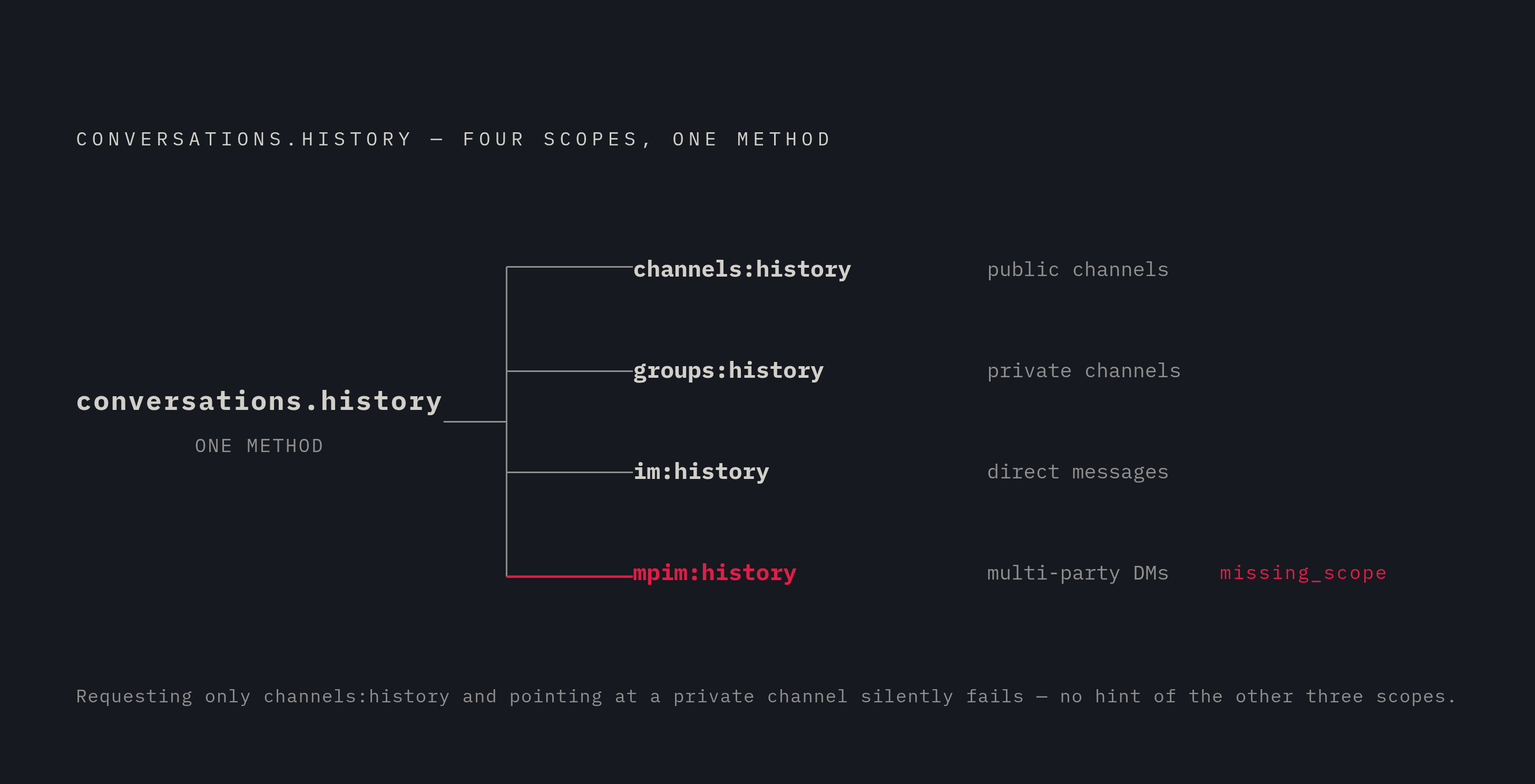
Start with reading history. conversations.history, the method behind most "catch me up on this channel" functionality, doesn't run on one umbrella scope. Request only channels:history and point the agent at a private channel, and the call fails with missing_scope, with nothing in that error to suggest that four separate scopes were hiding behind what looked like a single method. An agent built to read "whatever channel is relevant" at runtime has to be covered for all four conversation types it's permitted to touch, because it won't know in advance which one it lands in.
Writing has its own trap. chat:write lets a bot post in channels it already belongs to, but sending a message into a channel the app has never joined needs a separate scope, chat:write.public, described by Slack as what lets an app "send messages to channels your Slack app isn't a member of." A bot that only has chat:write and tries to post somewhere new doesn't fail with an obvious permissions error. Renaming or re-skinning the bot's identity per task, something an agent assigned to multiple projects might reasonably want to do, needs yet another distinct scope, chat:write.customize, separate from either of the above.
Search works differently still. search.messages, the method behind "find what we said about X," runs only on a user token, and only with the search:read scope, at a rate tier of 20 or more calls per minute. There's no bot-token path to the same functionality. Any agent whose job includes searching past conversation has to carry a user token, no matter how complete its bot scopes are.
The pattern holds elsewhere, too. Scope answers whether the app is allowed to use a class of access. It says nothing about whether using it, in that moment, for that task, is the right call.
Consider an agent described in three sentences: it reads a private engineering channel, posts updates into a public channel it has never joined, and renames itself depending on which repository it's working on. The natural first draft of that scope list, built by someone reading method names rather than the scope reference, asks for chat:write and channels:history instead, and every one of the three operations fails, each with an error that doesn't point back at the missing scope.
The lesson scales with the agent's capability. If an agent's runtime behavior can range widely, from reading to posting to searching to renaming itself, its scope list has to be built to cover that full range before the agent ever runs, not discovered one missing_scope error at a time in production. That requirement runs straight into least-privilege, which asks for the opposite: grant only what's needed, nothing more.
Applying least-privilege to a caller whose actions aren't known until runtime
The tension looks like a contradiction: an agent needs broad scopes to be useful across the range of things it might do, and least-privilege asks for the narrowest possible grant. The contradiction resolves once least-privilege is defined correctly. Least-privilege for an agent was never about shrinking the scope list to the smallest number of entries. It's about bounding the set of Slack objects, channels, messages, files, that the agent is permitted to touch for a given task, and that's a task-level constraint that OAuth scopes were never built to enforce on their own.
Scopes answer exactly one question: can the app use this class of Slack access? They can't answer the next question, which is whether this agent should use that access for this task, in this channel, with these specific arguments, right now. Trying to force OAuth scopes to answer both questions is what produces the apparent contradiction. The fix is a two-layer design: define the agent's permitted action space at design time, map that space to the minimum scope set that covers it, and enforce the finer-grained channel- and object-level restrictions in the agent's own task layer, not in OAuth.
That second layer has to take conversation type seriously, because each type carries different expectations. A public channel can still hold sensitive material even though anyone in the workspace can technically join it. A policy tuned for #release-updates is very likely the wrong policy for an HR direct message, an incident response room, a legal thread, or a live customer negotiation, even if the same bot technically holds scopes that cover all of them. An agent holding channels:history, groups:history, im:history, and mpim:history has a perfectly valid scope set and still needs something else, a rule enforced in its own task logic, to keep it out of channels that happen to be technically reachable but substantively off-limits for the task at hand.
Slack's own platform gave this approach a sharper tool on March 16, 2026, with the introduction of optional scopes. Workspace admins can pre-approve which optional scopes are even available to grant, and the person installing the app sees optional scopes presented separately from required ones, with the choice of which to accept left in their hands. That turns the outer boundary, the OAuth layer, into something closer to a real least-privilege control: an app can ship with a minimal required scope set and let individual installs opt into broader capability only where it's actually needed, instead of asking every workspace to accept the agent's maximum possible footprint on day one.
The same logic applies to write access specifically. And none of this holds up if the tokens themselves aren't handled carefully: keeping delegated tokens stored and refreshed in a layer separate from the agent's own runtime limits how much damage follows if the agent is compromised or simply misbehaves, because the tokens aren't sitting inside the same process that's making the mistakes.
The May 2025 rate-limit change and conversation history
Getting the scope list right doesn't mean an agent is clear to operate. An agent that reads conversation history with any regularity will run into Slack's rate limits before it ever runs into a scope error, and the fix lives outside the scope list.
Since May 29, 2025, new installs of unlisted commercial apps have had conversations.history and conversations.replies restricted sharply: a low number of requests per minute, and a small cap on how many objects come back per call. For an agent that reads history as routine context before acting, the pattern behind most summarization, search, or triage workflows, that restriction is close to unusable, because an agent that checks history before every task will exhaust its quota under completely ordinary use, not under any kind of abuse or edge case.
The fix is a distribution decision. A team that treats Marketplace listing as a later, optional step is setting itself up to discover the rate limit in production, after the agent is already in people's workspaces.
Catching these failures also takes a different kind of discipline than checking HTTP status codes. Slack's API returns errors with an HTTP 200 status and a JSON body where ok is set to false, so a client built to trust status codes alone won't notice a rate-limit failure or a missing scope until something downstream breaks in a way nobody expected. Both conditions have to be checked explicitly inside the agent's own API-handling code, by reading the body, not just the status line.
And when a scope really is missing, there's no code fix available. The only remedy is sending the installing user back through the authorize URL with the fuller scope list, which adds the new scope to the existing grant because Slack scopes accumulate additively, and it's a user-facing re-consent step worth planning for as a real part of the agent's operational life.
Testing agentic Slack integrations without live credentials or rate-limit exposure
The same three properties that make scope selection hard for an agent, runtime non-determinism, a conversation history that carries state, and multi-step sequences where reading and writing depend on each other, also make it slow and expensive to test these integrations against a live Slack workspace. Running a test suite against production Slack means burning real rate limit budget, risking real messages landing in real channels, and waiting on live API latency for every run.
A stateless mock doesn't solve this, because it can't tell a team anything about whether the scopes an agent was granted actually cover the combination of actions the agent takes across a multi-step task. A mock that returns a fixed, hardcoded channel history object confirms that the agent parses a response correctly. More fundamentally, a mock without state can't represent the world an agentic workflow actually operates in, where a message posted in one step becomes visible to a search run two steps later. That read-after-write dependency is the normal shape of agentic Slack work, and testing against something that resets to a blank slate on every call will miss exactly the failures that matter most once the agent is live.