Linear Agent Side Effects on Team Workflows and Notifications
Map every output and guard against repeats before Linear Loops go live.
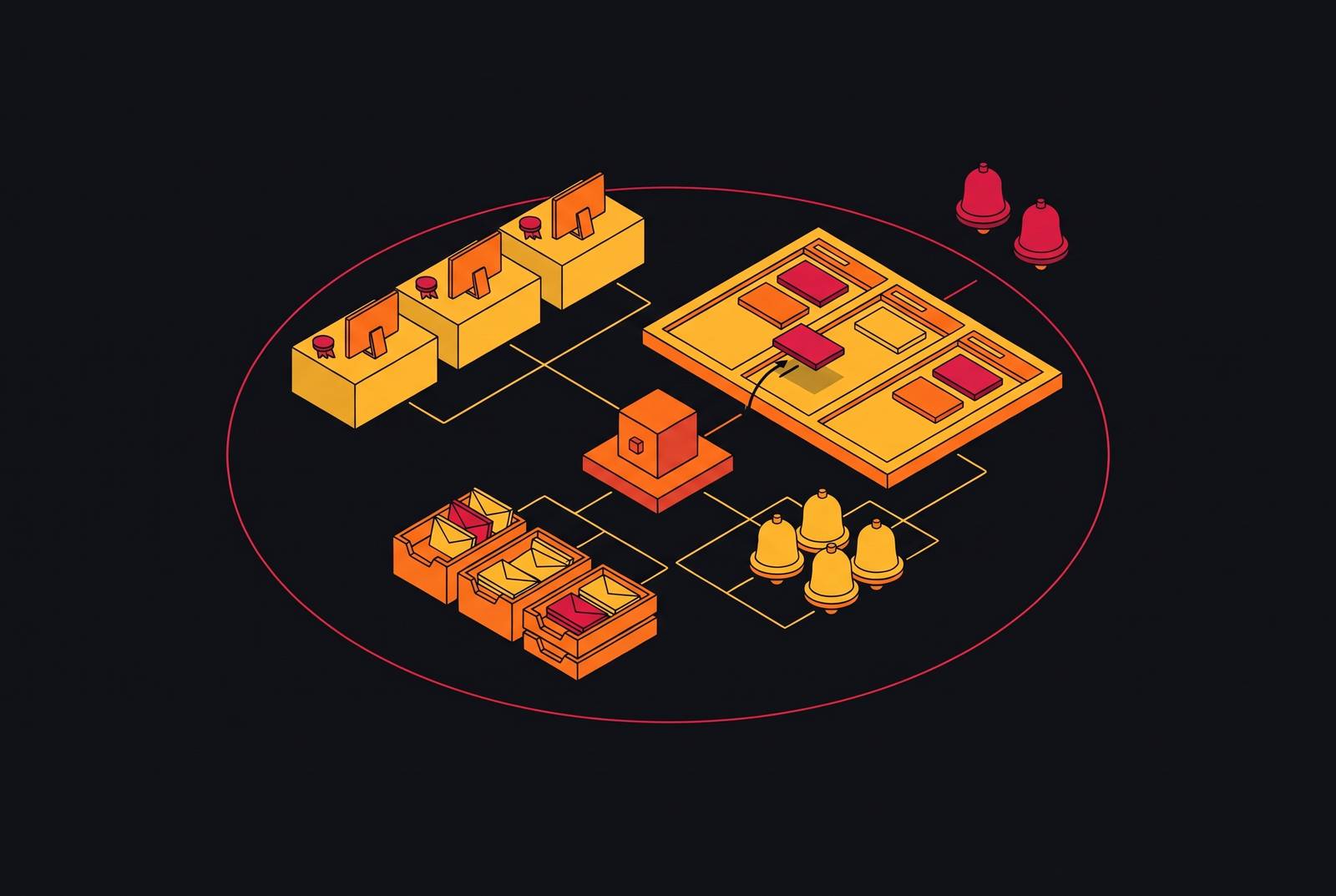
Issue creation, Slack posts, and GitHub-triggered Loops also determine where work lands and who hears about it. Teams can configure those effects intentionally only by tracing the full output chain, controlling repeated actions, and testing the workflow as a connected sequence of API calls.
What Linear Agent actually does when it acts on your behalf
Linear Agent can create issues, sync comment threads bidirectionally between Slack and Linear, and post updates to other tools. Its work crosses product boundaries. An action therefore has both a direct result, such as a new issue, and side effects in the places where people discuss and track that work.
Loops let the agent do this work again when a workflow runs. Linear’s September 14, 2026 changelog describes Loops responding to workspace activity, including changes to initiatives, projects, and cycles, while also editing Linear documents and posting updates to Slack. The trigger and the output need not occupy the same tool. A change in tracked work can lead to a document edit and a message in another tool, without a person deciding on each output.
The connection also persists after the initial action. Linear’s Slack integration documentation states that the Slack thread updates when the issue is completed, canceled, or marked as a duplicate. Bidirectional comment sync keeps the conversation up to date after it is first posted. The issue and its discussion remain connected, so understanding an automated action requires accounting for later updates as well as its first visible output.
How the October 2026 external triggers update expanded where actions can originate
Linear’s October 22, 2026 changelog added Slack and GitHub events as sources that can start Loops automatically. This expands where automated work can begin. The July launch had described Loops running on a schedule or in response to an event, with context drawn from connected tools.
The changelog gives two concrete examples of that expansion. In that case, an action during code review can start planning work in Linear. Someone no longer has to notice the label and separately start that work.
The announcement leaves subscription-plan eligibility, rollout cohorts, and the full set of available event filters unspecified. The examples establish supported uses. Teams should check their own plan eligibility before they rely on external triggers in production workflows.
The chain of automated outputs a single trigger can produce across Slack, Linear, and GitHub
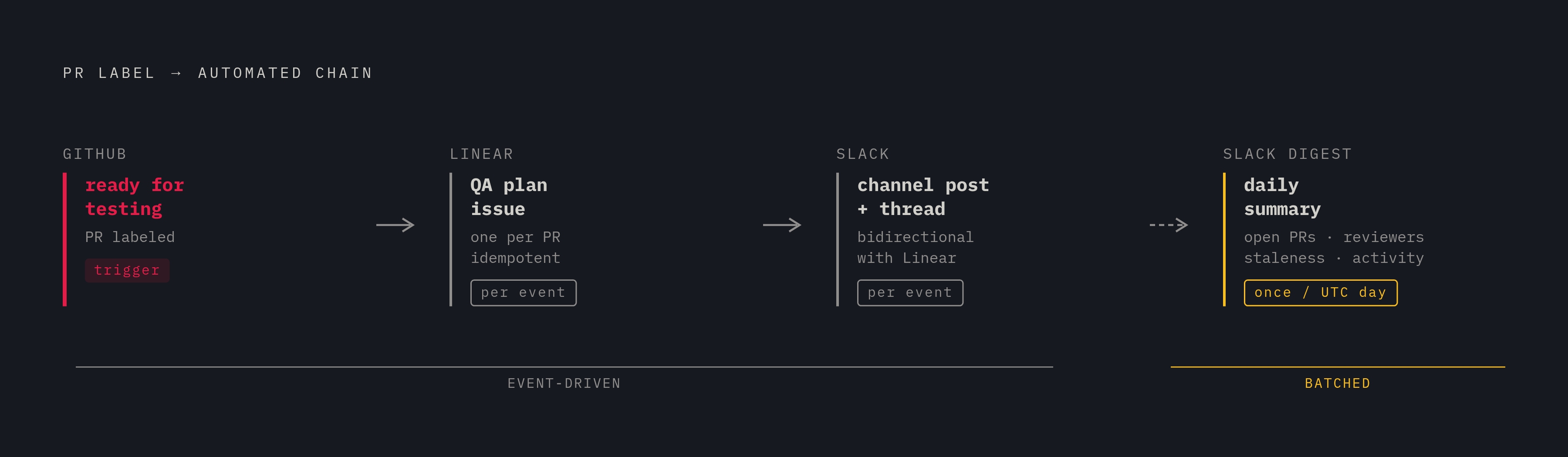
A GitHub pull request labeled “ready for testing” can begin a chain that drafts a QA plan in Linear, posts to a Slack channel, and maintains a bidirectional thread between Slack and the Linear issue. Each output serves a different role. What begins as a label can therefore change both the work queue and the conversation around it.
The Scalekit DevOps agent pattern illustrates a related end-to-end chain with an explicit creation constraint. When a GitHub pull request gets a label, exactly one corresponding Linear issue is created automatically. At the start of each UTC day, or on the agent’s first loop, it compiles and posts a daily Slack digest. That digest summarizes open PRs, reviewer status, staleness indicators, linked Linear issues, and repository activity.
The label produces a corresponding work item, while the digest presents accumulated state rather than turning every event into a standalone post. The chain shows why a trigger cannot be evaluated solely by asking whether it created the right issue. Its reporting cadence also determines how that work reaches the team.
Why notification sprawl is the first thing teams notice — and why deduplication is harder than it looks
Linear’s changelog records a fix for double-notifying on Slack when an issue is deduplicated. After the fix, the duplicate-relation event is the only user-facing event. This is a documented production problem. It demonstrates that even an operation intended to resolve duplication can itself produce redundant notifications when more than one event represents the same user-facing change.
Linear’s Slack integration documentation lists notifications for teams, projects, initiatives, individuals, and views. Once the integration is configured, users can set up the notification types available to them. A new Loop or external trigger enters a workspace where notification choices are already in place. Its own Slack posts can add to messages sent through those other paths.
Polling-based agents introduce a separate source of duplication. Without idempotency, a single “bug” label can create a Linear issue on every poll cycle, producing five issues across five cycles and repeatedly notifying Slack. The repeated input has not become new work. The agent has simply failed to distinguish an already-handled event from one requiring an external action.
A local state store that explicitly maps PRs to Linear issues prevents duplicate creation and race conditions. Any agent that creates external objects needs idempotent logic so repeated runs do not produce additional side effects. Notification deduplication and creation idempotency are therefore related but different controls. Suppressing a redundant message does not prevent duplicate issues, while preventing duplicate issues does not by itself resolve overlapping notification routes.
How automation scope and plan tier determine which teams feel these effects most
Access determines when teams encounter these problems. Plan tier and automation scope affect who can configure workflows, although the October announcement does not establish the precise eligibility boundary for external triggers. Teams without automation access may instead use ad-hoc scripts or third-party connectors. The Scalekit pattern illustrates that alternative route, which places responsibility for idempotency and deduplication in the integration infrastructure.
Teams gaining access mid-project face a different transition. Their notification settings may have been chosen for a manual workflow, where issue creation and updates depended on deliberate human actions. Turning on Loops changes how many of those actions take place and where they start, while the notification settings may stay the same. Defaults that were useful before automation can consequently produce sprawl as soon as the automated workflow starts. Exposure depends on both what a team can enable and the routing rules already in place when it does.
What intentional configuration of these side effects actually looks like
For teams preparing to enable Loops or external triggers, the practical intervention is to map the outputs before activation. That map should identify which Slack channels receive posts and which notification types are enabled for each team, project, initiative, individual, and view involved. It should also establish whether the initiating event, such as a GitHub label or Slack message, can fire repeatedly within a short window. The map shows where one action could reach the same people through more than one path.
Issue-creating workflows also need an explicit idempotency check. A team should maintain a state record, such as a mapping from PR ID to Linear issue ID, so repeated external triggers do not create duplicate issues or notifications. The workflow should recognize the object it already created when the same trigger appears again.
Slack output can then be scoped independently of issue creation. The daily-digest pattern provides a model in which the agent accumulates state and posts a single structured update once per day. Visibility remains, but the reporting cadence changes. This separates the need to create work promptly from the need to announce every change immediately.
Linear Asks provides another scoping model based on origin. Linear’s May 2026 changelog describes checking the templates enabled for a channel, selecting the best match, and creating an issue using the conversation as context. Channel configuration bounds what the agent can create. For a team designing automation, that approach complements event-based filtering by making the place where a request begins part of the decision about what happens next.
Why testing these automated chains in isolation — against live APIs — undermines the configuration work
Teams still need a test environment that can run the connected workflow to check the settings they choose. A Linear, Slack, and GitHub chain is sequential and stateful, because later actions depend on objects and changes produced earlier. Testing each request independently misses that dependency. A successful issue-creation response and a successful Slack-post response do not establish that the post refers to the issue the workflow actually created.
Stateless mocks can return a configured issue identifier and later return a notification containing the same identifier, with the agreement supplied by the mock configuration. It does not demonstrate that the integration preserved the relationship. Redocly’s sandbox requirements guide distinguishes HTTP contract verification from validation of stateful business logic, including state transitions, transactional logic, and asynchronous processing such as waiting for a webhook after a long-running job.
For the label-to-issue workflow, the missing state also weakens the idempotency test. The test needs to preserve the outcome of the first creation when it exercises a repeated trigger. Otherwise, it cannot meaningfully test whether another run creates an additional issue. A sequence of individually valid responses can conceal the very duplication that the configuration was intended to prevent.
Live API testing introduces a different weakness in CI. Rate limits can generate false failure signals, third-party sandboxes can experience undocumented downtime, and silent schema drift can cause build failures. Those failures can block the pipeline even when the integration has no defects. Testing against a live environment therefore does not automatically provide dependable evidence that the configured notification and creation rules hold across the chain.
What a stateful, verified simulator provides that mocks and live sandboxes cannot for multi-step agent workflows
A stateful simulator can keep created objects from one request to the next, enforce state transitions, and fire webhook events when state changes. The chain can run without live credentials or exposure to live API rate limits.
State alone is not sufficient for fidelity. Continuous verification against the live API is necessary because a simulator that drifts from actual behavior can produce the same false confidence as a stateless mock.
Fault injection makes that environment relevant to failure handling as well as successful execution. A Loop dependent on a GitHub webhook should be tested against delivery failures, with controllable latency, 429s, and 503s. Those conditions let the test exercise repeated attempts against retained state. The configuration’s promise of one corresponding issue can then be evaluated under disruption.
The same requirements apply to RL environments and AI agent pipelines that make Linear, Slack, or GitHub tool calls. Meaningful evaluation needs deterministic, controllable state so results reflect the agent’s behavior. Teams can test whether their creation rules, notification paths, and reporting cadence work through the whole automated sequence before colleagues see its outputs.